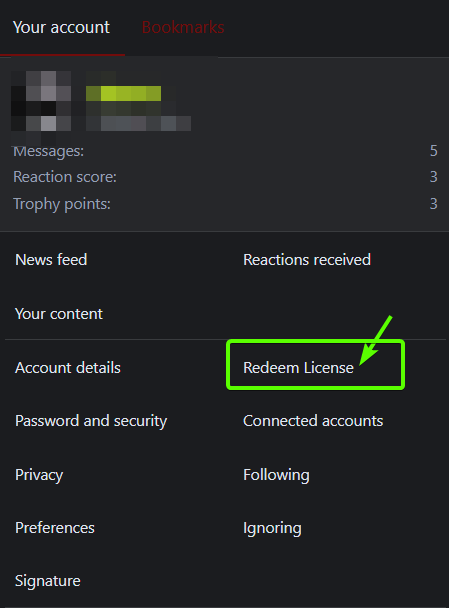
> For the complete documentation index, see [llms.txt](https://docs.realdudesinc.net/llms.txt). Markdown versions of documentation pages are available by appending `.md` to page URLs; this page is available as [Markdown](https://docs.realdudesinc.net/product-documentation/cs2-products/vanity-cs2-software/how-do-i-download-and-install.md).
# How do I download and install?
### **Please follow the steps below to redeem and download Vanity**
1. Go to the official [Vanity Website](https://vanitycheats.xyz/).
2. Create an account if you don’t already have one. (Use a valid email and remember your login credentials.)
3. After logging in, click your profile picture in the top-right corner of the site.
4. Select “Redeem License” from the dropdown menu.
5. In the License Key field, paste the key you received from RealDudesInc.
6. Click “APPLY” to activate your license.
7. Once your key is redeemed, the download button will appear in your dashboard. Click it to download the loader and begin setup.
### **Injection troubleshooting**
* Loader says "Incorrect password/username" even though my password is correct
* Paste in your username and password into the loader fields instead of typing them out manually.
* **"Sign In" button not working**
* Make sure you have your Anti-Virus/Anti-Malware software such as Windows Defender, Norton, Avira, Malware Bytes, completely disabled when running the loader as it can block the connection of the loader to Vanity's servers.
* **"Steam is outdated (32bit)!"**
* This means that your steam client is still running as a 32-bit application, there is no other way to force it to update other than reinstalling Steam completely.
* **"Server is unreachable"**
* This means that the loader cannot connect to our servers. This is usually caused by improper DNS resolver settings. To fix it, please change your DNS resolver to Cloudflare's address ( )
---
# Agent Instructions
This documentation is published with GitBook. GitBook is the documentation platform designed so that both humans and AI agents can read, navigate, and reason over technical content effectively. Learn more at gitbook.com.
## Querying This Documentation
If you need additional information that is not directly available in this page, you can query the documentation dynamically by asking a question.
Perform an HTTP GET request on the current page URL with the `ask` query parameter, and the optional `goal` query parameter:
```
GET https://docs.realdudesinc.net/product-documentation/cs2-products/vanity-cs2-software/how-do-i-download-and-install.md?ask=&goal=
```
`ask` is the immediate question: it should be specific, self-contained, and written in natural language.
`goal` is optional and describes the broader end goal you are ultimately trying to accomplish on behalf of the user. GitBook uses it to tailor the answer towards what is most useful for that goal.
The response will contain a direct answer to the question and relevant excerpts and sources from the documentation.
Use this mechanism when the answer is not explicitly present in the current page, you need clarification or additional context, or you want to retrieve related documentation sections.