> For the complete documentation index, see [llms.txt](https://docs.realdudesinc.net/llms.txt). Markdown versions of documentation pages are available by appending `.md` to page URLs; this page is available as [Markdown](https://docs.realdudesinc.net/product-documentation/arc-raiders/belltower-arc-raiders-software/how-do-i-download-and-install.md).
# How do I download and install?
### **Please follow the steps below to redeem and download BellTower**
### **Requirements:**
* Recommended: make sure you're on the latest windows version
* Make sure your GPU Driver is up to date
* Disable Discord Overlay / Nvidia Overlay / Shadowplay / ReShade / Overwolf
* Uninstall Riva Tuner if you have it installed
* Uninstall FaceIT AC if you have it installed
* Don't use a Custom OS
* Windows App Scaling = 100%
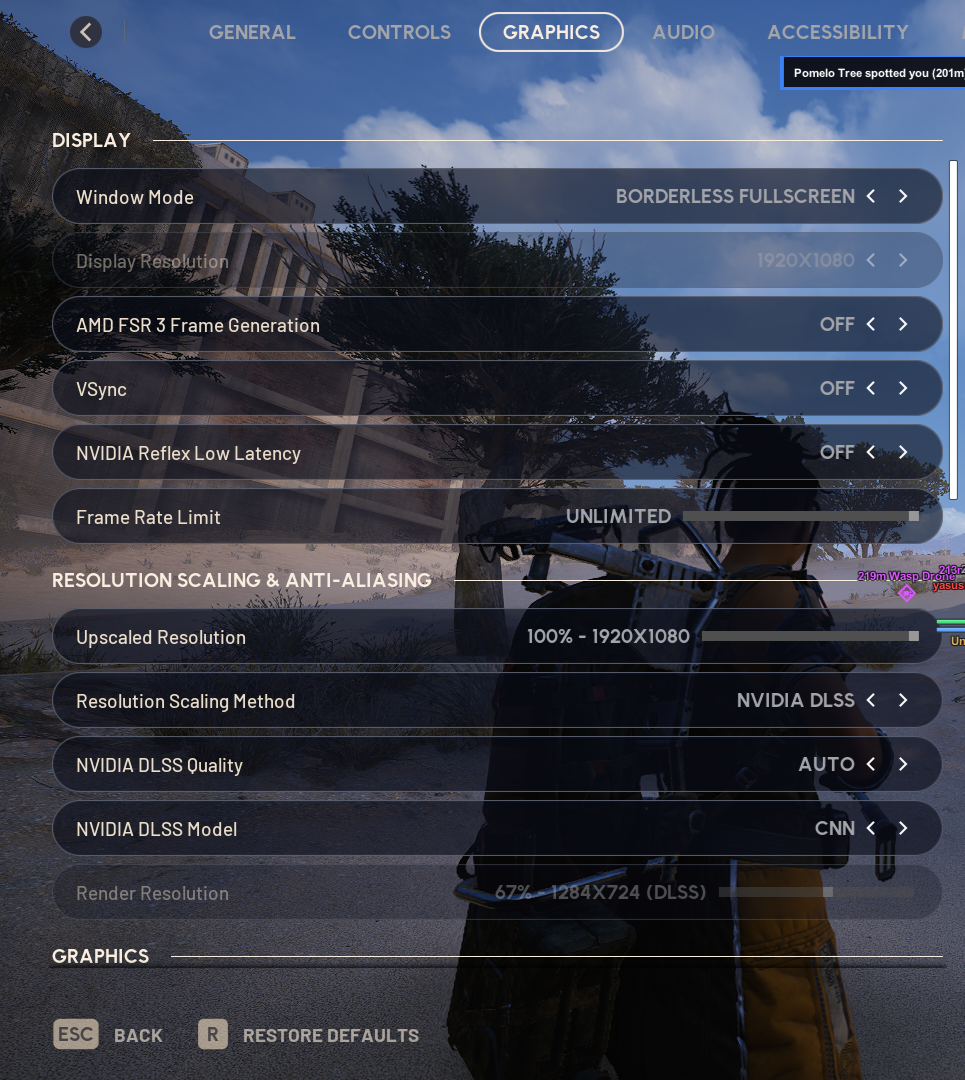
### **Recommended Arc Raiders In-Game Settings**
* These ingame settings (please refer to the screenshots) are confirmed to fix the crash some people have, be sure to follow them, especially to disable NVIDIA Reflex and Frame Generation
* On top of that make sure you dont use Frame Generation / Anti-Lag / Nvidia Reflex or similar in the Nvidia / AMD Control Panel
### **Disable Windows Defender**
* Press Windows + I to open Windows Settings
* Click Update & Security -> Windows Security -> Virus & threat protection
* Locate the “Virus & threat protection settings” section and click Manage settings.
* Real-time protection > TURN OFF
* Cloud delivered protection > TURN OFF
* Automatic sample submission > TURN OFF
* Tamper protection > TURN OFF
**WinRAR** [**Download WinRAR**](https://www.win-rar.com/download.html?\&L=0) **and install it**
**dControl**
* Download the [Setup Files](https://mega.nz/file/2gZ2gJ7A#vqXmKoKreL8ASsfDDQW1T2xS0mcOt3si3HH6GIroJQE)
* Unzip the downloaded .rar file (Password: 123)
* Unzip dControl.rar (Password: sordum)
* Run dControl.exe as Admin
* Click “Disable Windows Defender”
### **Prepare your System:**
* Run our Auto Setup.exe as Admin and press "Auto Setup"
* Close unused background apps
### **Loader Setup**
* Download both x64 and x86:
*
*
* Double click and install both of them \[DO NOT run them as admin!]
* [Download DirectX Runtimes](https://www.microsoft.com/en-US/download/details.aspx?id=35)
* Open the DirectX installer and install it
* Restart your PC before you continue
### **Prepare the Game**
* Open Steam always as Admin
* Set your game to Borderless / Fullscreen Windowed
* Disable Frame Generation
* Disable Nvidia Reflex
* Don't use any launch parameters (Right click the game -> properties)
* Close the Game
### **The Loader**
* Visit:
* Enter your license key
* Your client is generated specifically for you
* Extract the Loader with WinRAR onto your Desktop or subfolder
* Make sure the Loader is on the same Drive as your Game Installation
* Be sure you don't have any game open
* Open the loader always as Administrator
* Enter your key
* Choose the Product
* Press Load
* Wait till the loader tells you to start your game
* Start the Game
### **Extra Info**
* Menu Key = **INSERT**
* Panic Key = **DELETE**
If you are having issues, please check [Troubleshooting Guide/FAQ](https://realdudesinc.net/faq/BellTower-arc-software-help-faq).
**If you still experience any type of issues, open a ticket in** [**Discord**](https://discord.gg/3cdWxMGhsT)**.**
---
# Agent Instructions
This documentation is published with GitBook. GitBook is the documentation platform designed so that both humans and AI agents can read, navigate, and reason over technical content effectively. Learn more at gitbook.com.
## Querying This Documentation
If you need additional information that is not directly available in this page, you can query the documentation dynamically by asking a question.
Perform an HTTP GET request on the current page URL with the `ask` query parameter, and the optional `goal` query parameter:
```
GET https://docs.realdudesinc.net/product-documentation/arc-raiders/belltower-arc-raiders-software/how-do-i-download-and-install.md?ask=&goal=
```
`ask` is the immediate question: it should be specific, self-contained, and written in natural language.
`goal` is optional and describes the broader end goal you are ultimately trying to accomplish on behalf of the user. GitBook uses it to tailor the answer towards what is most useful for that goal.
The response will contain a direct answer to the question and relevant excerpts and sources from the documentation.
Use this mechanism when the answer is not explicitly present in the current page, you need clarification or additional context, or you want to retrieve related documentation sections.